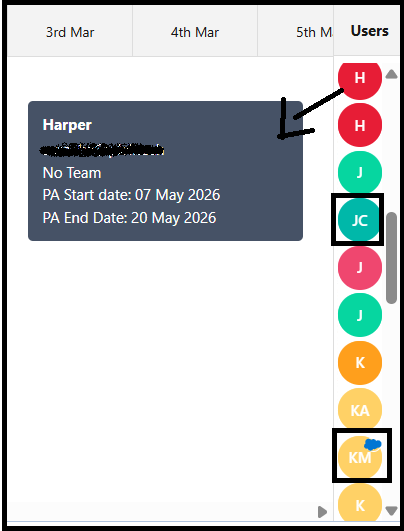
Users Displayed on the Project View Page
There are three types of users shown on the Project View page:
- TimeTracker Users
- Project Assignment Users
- Salesforce Users
1. TimeTracker User
- Displays user initials using the first letter of the First Name and Last Name (for example: JC).
- When you hover over the user icon, the following details are displayed:
- User Name
- User Email ID
- Assigned Team
- If the user has uploaded a profile image, the image will be shown instead of initials.
2. Project Assignment User
- Represents users assigned to the Project through Project Assignment.
- When you hover over the user icon, it displays:
- User Name
- Assigned Team (if available)
- Project Assignment Start Date
- Project Assignment End Date.
3. Salesforce User
- Represents standard Salesforce users.
- If the user has added a profile image in Salesforce, the image is displayed as the user icon.
- A cloud icon appears on the profile image to indicate a Salesforce user.
Since three different types of users are displayed on the Project View page, the icons vary to help you easily distinguish between them.